Hubmaster has a simple description maker for eBay, and this is a guide on how to use it. Happy to give refreshers, so call us if you get stuck.
We customise these description makers according to your requirements, so yours might look different.
There will be an automated listing maker later this year, so this tool is intended as a stop gap.
If you have used an Imagehoarder account for your images, the section for adding your image urls is slightly different.
Get ready
- In eBay, find an existing listing which is similar, “create similar”
- Hubmaster, go to eBay > eBay Listing Templates
- Your website, go to the product page of the item you want to list
Populate the main details of your new eBay listing
- Copy the product title from your website to the new eBay listing
- On your website
- open the detailed images
- point at the images you want to use
- right click and choose “save image as”
- On eBay upload those images to the pictures section
- Check the rest of the listing, apart from the description. Things like colours, type, postage, shipping etc
Populate the description part of your new eBay listing
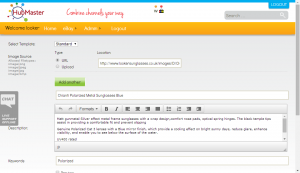
- In Hubmaster, click “Generate listing”
- On your website
- open the detailed images
- point at the image you want to use, right click and choose “copy image location”
- paste into the “Location” box in Hubmaster
- if you want to use more than one image, then click “Add Another” and repeat.
- Copy the product title from the Looker website and paste into the Hubmaster “Title” box
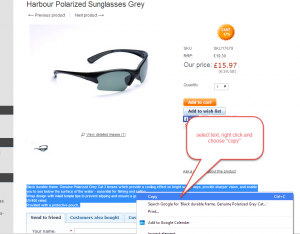
- Copy the product description from Looker website, paste into Hubmaster “Description” box
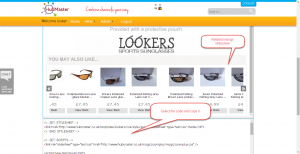
- Add the keyword to the “Keyword” box, this will generate the slideshow of related items.
- Choose a single keyword that appears in the title of your other listings
- Tick “Preview”, Click “Generate”
- Check the listing description looks ok
- then select all the code and copy it
- paste into the eBay description (html) box
- in eBay click “Continue”